Language Models [02] - EDA
We start the implementation with exploratory dataset analysis and a project template.
This post is a part of a series;
- Introduction and theory
- Dataset exploratory analysis (you are here)
- Tokenizer
- Training the model
- Evaluation of language model
- Experiments with the model
- Exercises for you
Project template
If you want to code along (I strongly recommend such an approach), you can use any project template you like. The template I will use is following:
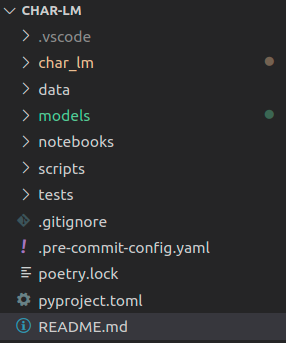
Going top-down:
char_lm- Directory with model’s packagedata- All data. It contains multiple subdirectoriesraw- Data as downloaded/scrapped/extracted. Read only, no manual manipulations allowed!interim- Intermediate formats - after prerocessing etcdataset- Datasets after preparatons, ready to be used by models.
models- Storing trained modelsnotebooks- Jupyter notebooks used for exploration/rough experimentation. No other use allowed!scripts- Utility scripts that are not part of model package. Distinction betweenscriptsandchar_lmis pretty arbitrarytests- unit tests. Yes, we are going to write them..pre-commit-config.yaml- I use pre-commit to help me keep code quality. Optionalpoetry.lock/pyproject.toml- I use poetry for installing packages. I encourage you to give a try but it is file to stick with conda/pip
You can download the complete project (when it will be completed, the link will appear here)
Dataset
As I stated in the first part, we will start with the character language model and switch to subword later. For now, a suitable dataset is US Census: City and Place Names
. Download and extract it to data/raw/us-city-place-names.csv. Spend a few minutes to familiarize yourself with the data, and we will go to exploration.
Complete notebook is avaliable on github: https://github.com/artofai/char-lm/blob/master/notebooks/cities-eda.ipynb .
EDA
The first issue is encoding. If we try to load it with default pd.read_csv settings, it will throw a Unicode exception. Unfortunately, there is no information about encoding on the dataset page, so I did a small investigation, and it looks like ISO-8859-1 (or Latin-1 - it’s the same) is the correct one.
|
|
|
|
There are three columns. We are interested only in city. Interestingly, we could also utilize information about the state but let’s leave it for another time.
There are no nulls (yay), and after deduplicating city, we have about 25000 examples - decent.
|
|
|
|
|
|
|
|
Analysis of city lengths (in characters).
|
|
The distribution looks pretty nice - skewed normal distribution with a bit of tail. Let’s take a look at the longest examples:
|
|
|
|
I don’t live in the US, so names with (balance) is a mystery. I will remove them later.
Next, let’s take a look at character distributions:
|
|
|
|
Looks good, except character ñ and /.
Removing outliers
According to our analysis, we are going to remove entries containing any of ()ñ/.
|
|
|
|
It is always good to make a sanity check - how much data will be removed and what. This operation will remove 20 examples - for me, the removal list looks great.
At this point, I stop the EDA. In cleaned_cities, there is a list of cities used for modeling.
Build dataset script
We could, in theory, save the dataset from the exploratory notebook. But it would be a bad practice - data engineering and exploration shouldn’t be mixed. Because of this, let’s create a data preprocessing script in scripts/build_dataset.py
Our knowledge from EDA can be transferred to a function. We already know what kind of preprocessing we want to apply, so implementation is straightforward:
|
|
The second piece is to take cleaned cities, split them into train/val/test and save them into separate files. I also save the entire dataset at this step - maybe it will be helpful later. To make the process deterministic, a random state can be provided.
|
|
Building blocks are ready. We can create a simple command-line interface using click. We want to pass the raw, input file, the output directory, specify the input file’s encoding, and a random state.
|
|
It is very simple: define main function with mentioned arguments and decorate them using click. In the body just pass relevant parameters to functions and let them do all work.
Summary
In this post, we performed the EDA and created a script for cleaning and preparing dataset.
Full script
The complete script is following:
|
|
print there is logger.info call. I will write a separate article on how and why use it. For now can use print if you prefer to.